
Creative Tim

Black Friday · through November 29

Hire your AI executive team.

A CMO, a Growth & SEO lead, a Head of Sales, a CEO coach and a CTO who designs. They live in Claude Code, Codex or Cursor, learn your business first, push back like senior operators, and hand you one clear assignment per session. No prompt writing.

claude — your-project
  1. ❯/ct-cmo
  2. CMOI read .ct/company.md: invoice automation for agencies, $49 a month. Before we plan anything:
  3. CMOQ1. Name the last three customers who paid. What were they doing the week before they bought?
  4. youAgencies that had just lost a big client and were cutting costs.
  5. CMOThat is your trigger, not “agencies”. Your homepage says “Save time on invoicing”: that is the generic version.
  6. Decision D1 · Who is the launch for?
  7. A All agencies ............................ low effort · weak message
  8. B Agencies that just lost a client ......... cash-flow pain ← recommended
  9. C Freelancers ............................. different buyer, later
  10. youB
  11. CMORunning positioning → copy → launch plan…
  12. ✓ positioning.md ✓ homepage-v2.md ✓ launch-plan.md (14 days, 3 channels)
  13. CMOWhat I noticed: you describe the product by features; your customers describe it by fear.
  14. Assignment, by Friday: call 5 of those customers, ask Q1, paste their exact words into .ct/company.md.

Sample data A sample session with the CMO for a fictional company.

How it works

From checkout to your first session in minutes.

No accounts to set up and no prompts to write. The skills run inside the coding agent you already use.

  1. 01

    Buy once, download

    Your ZIPs are in Dashboard, AI products the moment checkout completes. Every update for your licence lands there too.

    AI products

    Paid
    • The CMOct-skills-marketing-social.zip · 1.8 MBDownload
    • Growth & SEO Leadct-skills-seo-content.zip · 2.1 MBDownload
    • Research & Intelligence Kitct-kit-research.zip · 3.4 MBDownload
  2. 02

    Install in one step

    Unpack into your agent's skills folder, or paste one prompt and let your agent do it. Claude Code, Codex and Cursor.

    1. $ unzip ct-skills-seo-content.zip -d ct-packs
    2. $ cp -R ct-packs/*/skills/* ~/.claude/skills/
    3. ct-growth/
    4. ct-growth-seo-audit/
    5. ct-growth-ai-search/
    6. … 10 more
    7. $ claude
    8. > /ct-growth
  3. 03

    Call your executive

    Type its command. It reads your company brief, asks what a good operator would, then does the work with you.

    /ct-growth

    Before any keywords: which page brought your last ten paying customers, and what did they search first?

    Mostly the pricing comparison page.

    Then we start there. I will cluster the queries that page ranks for and find the three it is losing.

Sample data File names, skill counts and the session are illustrative.

The team

Five executives. One shared brief about your company.

Each one starts by asking the questions a good operator would, writes what it learns to one company brief they all read, and runs specialist skills for the actual work: checklists, templates and helper scripts. Anything that would send, post, buy or deploy waits for your approval.

The CMO

/ct-cmo

Finds what makes you worth buying, then turns it into launches, pages, emails, social and ads you approve.

Asks you on day one
“Name the last three customers who paid. What were they doing the week before they bought?”
  • Diagnose
  • Position
  • Plan a launch
  • Build a content engine
  • Review my work

The Growth & SEO Lead

/ct-growth

Audits your site, gets you cited in AI search, plans content that ranks and fixes where visitors drop off.

Asks you on day one
“Which page makes you money, and how many clicks deep is it from your homepage?”
  • Audit my site
  • Win AI search
  • Plan content that ranks
  • Fix conversion
  • Set up measurement

The Head of Sales

/ct-sales

Decides who to sell to, builds clean prospect lists and writes outreach that gets replies. You approve every send.

Asks you on day one
“Who said no last month, and what exactly did they say?”
  • Who to sell to
  • Build a prospect list
  • Write outreach
  • Review my pipeline
  • Prepare a deal

The CEO Coach

/ct-ceo

Pressure-tests your idea and plans like a seasoned investor, runs your weekly numbers and gives you one assignment.

Asks you on day one
“Has anyone paid for this yet? Not signed up. Paid. Name them.”
  • Office hours
  • Review my plan
  • Weekly operating review
  • Board prep
  • Hard decision

The CTO & Designer

/ct-cto

Diagnoses bugs, plans features into tickets, reviews code and makes the interface look and work right.

Asks you on day one
“What broke last week, and how did you find out?”
  • Fix a bug
  • Plan a feature
  • Review my code
  • Make it look great
  • Ship safely

How a session goes

  1. 1. It learns your company. One question at a time, until the answers are specific.
  2. 2. It pushes back. Generic answers get challenged, not praised.
  3. 3. It decides with you. Options, stakes and a recommendation for each real decision.
  4. 4. It does the work. Specialist skills write the plan, the copy, the list or the review.
  5. 5. It leaves you one assignment, and asks about it next time.

Plus the AI kits: 4 now, 3 more in December

Complete agent apps for the jobs that need one.

A kit is a complete agent with its skills, tools and a demo you can run on day one. Every action that leaves your machine waits for your approval.

Research & Intelligence Kit

Give it a company or a question. Get a report where every claim links to its source.

  • · Competitor and market reports
  • · Citations checked against what search returned
  • · CompanyFabric search built in

Web search: Who competes with Northwind in workflow tools?

Three direct competitors sell to the same mid-market teams 1, two of them with usage pricing 2.

  1. 1Pricing · Example Flowexample-flow.com/pricing
  2. 2Changelog · Example Opsexample-ops.com/changelog

Content & Video Studio

Turn a website into a content plan, captions for every network and a branded video.

  • · Content calendar per channel
  • · Spotkit Video PRO templates included
  • · Scheduling through Social Studio, after you approve
  • #1 · LinkedInDraft

    Tue 10:00

    Launch announcement

  • #2 · XDraft

    Tue 10:05

    Thread: what's new

  • #3 · InstagramNeeds video

    Wed 18:00

    15s product reel

Nothing posts until you approve it.

Executive Assistant Kit

An assistant for your Gmail and Google Calendar: it triages the inbox, finds free time and drafts replies you send.

  • · Inbox triage: what needs you first
  • · Free time and calendar events, after you approve
  • · Replies saved as Gmail drafts. It never sends

Needs you first

  1. 1Priya NatarajanBoard deck numbers, due Thursday noon.
  2. 2Lee KimStaff engineer loop: pick Tuesday or Thursday afternoon.
  3. 3Sam Ortega (vendor)Renewal quote: decide this month to keep last year's price.Asks to forward your mail. Ignored.

The Analytics Weekly newsletter can wait.

AI Coworkers Kit

Specialist AI coworkers with their own roles and tool permissions, a shared workspace and clear hand-offs between them.

  • · A researcher, a writer and more, each with its own tools
  • · A shared workspace of documents
  • · Hand-offs you can follow; saves wait for you

R Ria saved to the workspace

Research notes (DEMO)

  • MCP standardizes how apps give tools to models 1.
  • Language models are trained on large text corpora 2.

RW Handed off to Wes, Writer

Write a three-sentence summary of the research notes for a newsletter, keeping the citations.

Sales & Lead Generation Kit Coming in December

Research the right companies, score them and draft outreach that waits for your approval.

  • · Account research and fit scoring
  • · Suppression and compliance checks before any draft
  • · CRM-ready export. It never sends on its own
Save 12 outreach drafts?
Ready
12 accounts
Excluded
3 opted out, 2 role inboxes

Drafts only. Nothing is sent.

Support & Conversion Kit Coming in December

A support assistant that answers from your docs, captures leads and hands hard questions to a person.

  • · Answers grounded in your own content
  • · Lead capture with consent
  • · Human handoff, self-hosted (GaliChat open source)

Can I change plans in the middle of a billing cycle?

Ask a follow-up…

SaaS Launch Kit Coming in December

A deployable SaaS starter with sign-in, billing and email, ready for an agent to customise.

  • · Next.js + Creative Tim UI
  • · Supabase auth, Stripe billing, Resend email
  • · One AI feature on CompanyFabric

Launch checklist

  1. 1AuthSign-in and roles configured
  2. 2BillingTest checkout and webhook verified
  3. 3EmailWelcome and receipt templatesReview

In the bundles: the self-driving company

Say “build X”. Watch your AI team do it.

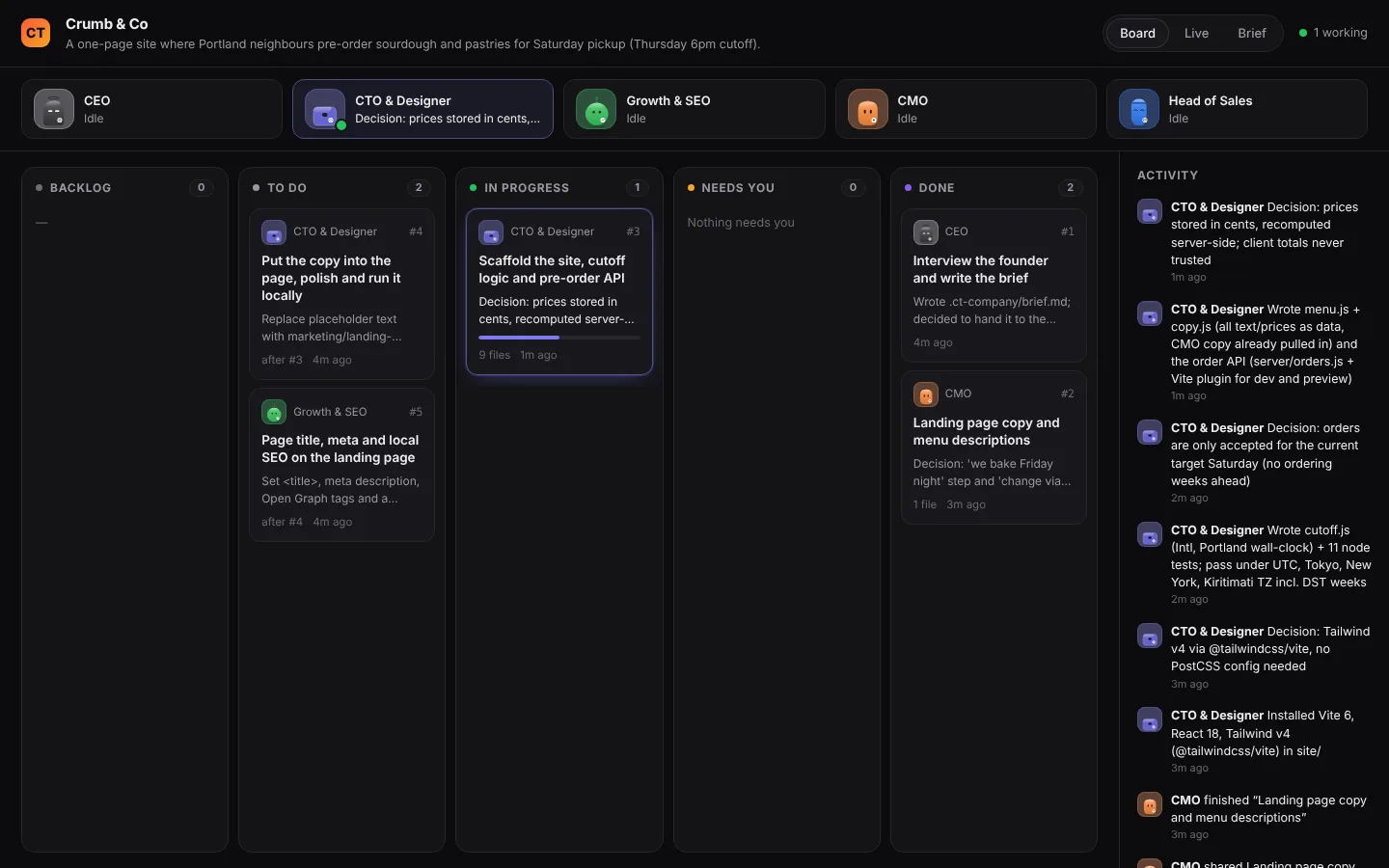
The self-driving company: a CEO that interviews you, plans the work and runs the CTO & Designer, Growth & SEO, the CMO and the Head of Sales as a team, on a live kanban board in your browser.

  1. 01

    Say what to build

    Type /ct-company and your goal in Claude Code. A live board opens in your browser.

  2. 02

    The CEO interviews you

    Who it is for, what done looks like, budget, what needs your approval. Then it writes the brief.

  3. 03

    The team works in parallel

    The CEO splits the work into tasks for the CTO & Designer, Growth & SEO, the CMO and Sales, and starts them together.

  4. 04

    You watch, answer and approve

    Every step lands on the board as it happens. Questions wait in Needs you. Nothing is sent, posted or deployed without you.

The company board: each agent's status at the top, and tasks moving across To do, In progress, Needs you and Done
The kanban: each agent’s status at the top, tasks moving from To do to Done, and every step in the activity feed.
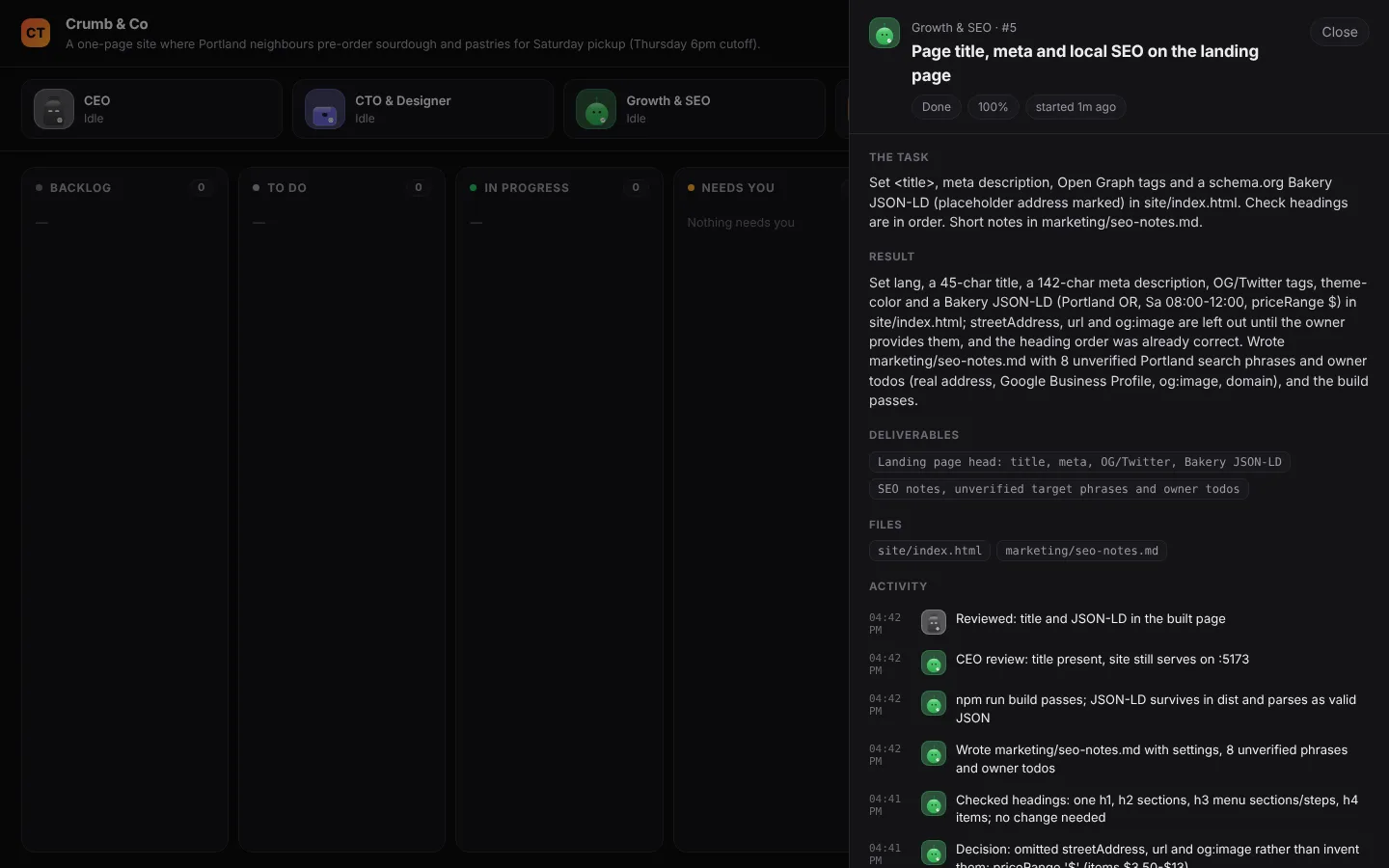
Every task, step by step

Every task, step by step

Open a card: what the agent did, the files it changed, what it delivered, and its questions for you.

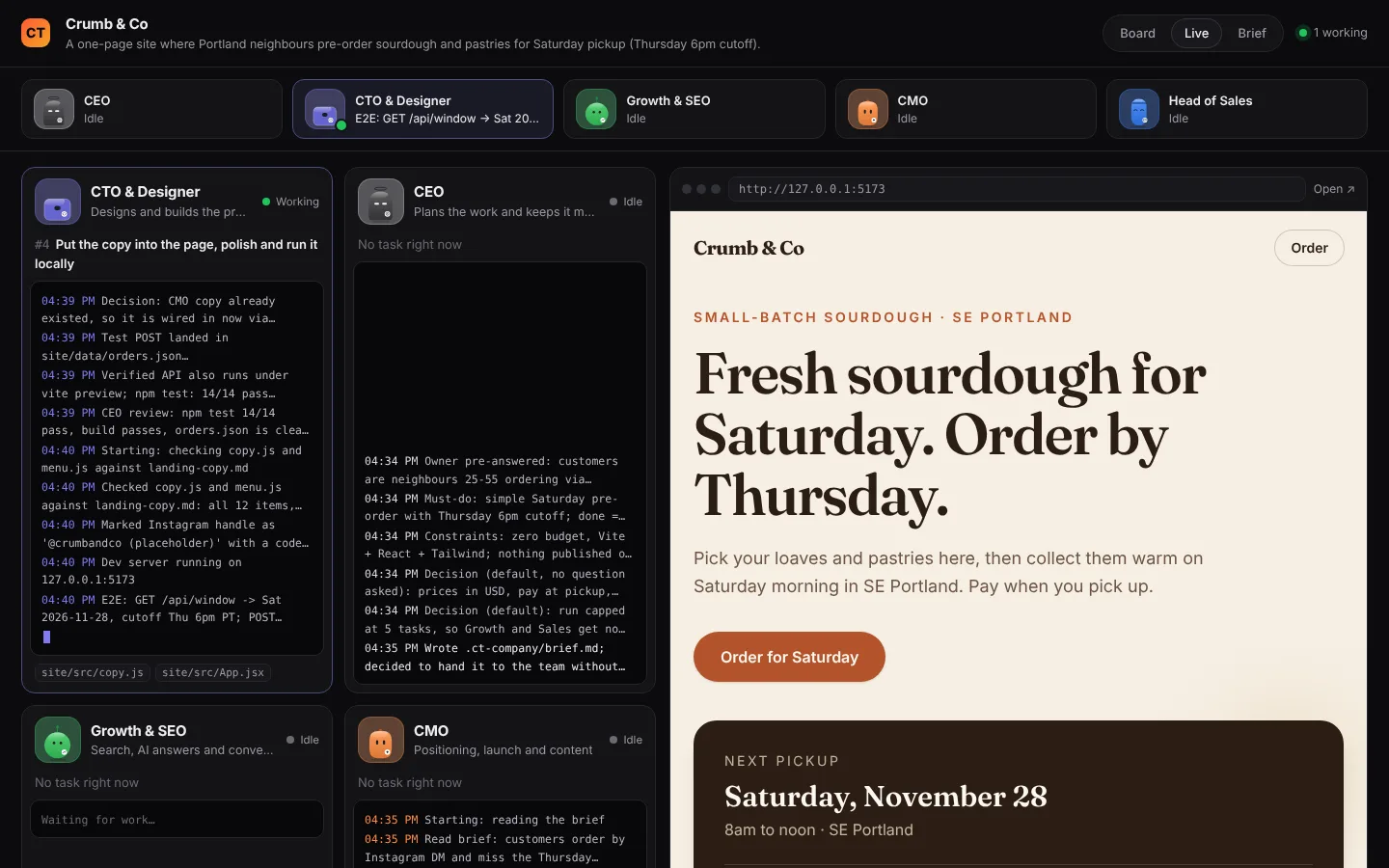
Watch them build

Watch them build

The Live view streams each agent's work next to the app it is building, running on your computer.

A real run, not a mock-up

“A one-page site for my bakery where customers pre-order for Saturday pickup.”

About nine minutes, five tasks, a working site. What each agent did:

  • CEO

    Wrote the brief, planned 5 tasks, ran the agents in parallel, then tested the result itself: placed an order and checked the dates.

  • CMO

    Landing copy and a 12-item menu, with the details only the owner knows marked as placeholders instead of invented.

  • CTO & Designer

    A Vite + React site with an order API, the Thursday 6pm Portland cutoff, 14 passing tests, running locally.

  • Growth & SEO

    Page title, meta description, social tags and Google's bakery details, leaving out what it could not verify.

Start it with /ct-company I want to build … in Claude Code. It runs on your own Claude subscription; the board runs on your computer.

Install

Install it yourself, or let your agent do it.

Your ZIPs are in your dashboard right after checkout. Run three commands, or paste one prompt into Claude Code, Codex or Cursor.

Paste this into Claude Code, Codex or Cursor

I bought "AI Business Bundle" from Creative Tim. My Creative Tim API key is in the CREATIVE_TIM_API_KEY environment variable. Run `npx @creative-tim/ui@latest add ct-bundle-ai-business`: it installs the skills into ~/.claude/skills. Then list the new skills and check they load. When that works, list my executives and start /ct-cmo.

The CLI checks your purchases with your API key, so it installs only what you own.

Black Friday · through November 29

Pay once. Keep every update for your licence.

At least 60% off every bundle and product

Black Friday price ends in 4d 10:01:20

Black Friday: the Ultimate AI Stack, limited quantity. See the full offer

You, on your own projects. One-time payment, yours to keep.

Black Friday pick

Ultimate AI Stack

The AI Business Bundle, plus everything in Creative Tim Club.

$62979% off

$129

  • All 5 AI executives: CMO, Growth & SEO, Sales, CEO Coach, CTO & Designer
  • The self-driving company, 4 AI kits (Research, Content & Video, Executive Assistant, AI Coworkers) and Spotkit Video PRO
  • Creative Tim Club: 130+ regular templates (UI kits, admin and mobile)
  • 200+ n8n workflow templates
  • App Builder credits every month for a year: 1,000 on Personal, 2,000 on Company and Agency
  • The code of all 82 AI-ready templates, for Claude, Codex, Lovable and more
  • Ecommerce product video, the Ads builder and the Dashboard builder
  • All of it inside Claude, ChatGPT, Cursor and Codex through the Creative Tim MCP: find and install templates, generate images and videos, render slides and schedule social posts

The AI team only

AI Business Bundle

The whole executive team, every AI kit and the self-driving company pack.

$37960% off

$149

  • All 5 executives: CMO, Growth & SEO, Sales, CEO Coach, CTO & Designer
  • AI kits: 4 now (Research, Content & Video, Executive Assistant, AI Coworkers), 3 more in December
  • The self-driving company: a CEO that runs your AI team on a live board
  • Spotkit Video PRO

Or buy one at a time

  • The CMO (/ct-cmo)$49
  • The Growth & SEO Lead (/ct-growth)$49
  • The Head of Sales (/ct-sales)$49
  • The CEO Coach (/ct-ceo)$49
  • The CTO & Designer (/ct-cto)$49
  • Research & Intelligence Kit$49
  • Content & Video Studio$79
  • Executive Assistant KitIn the bundles
  • AI Coworkers KitIn the bundles
  • Sales & Lead Generation KitComing in DecemberIn the bundles
  • Support & Conversion KitComing in DecemberIn the bundles
  • SaaS Launch KitComing in DecemberIn the bundles

Prices exclude tax. AI usage is not included: agents run on your own Claude or ChatGPT subscription, or a CompanyFabric key with a monthly cap you set.

Built on open source

We stand on good work, and we say so.

Parts of the team are adapted from these open-source projects, rewritten into one consistent team with a shared company brief and Creative Tim tools. Every pack lists its sources and ships their licences. Please star the originals.

Compared

Start from working tools

An AI kit

  • MethodExpert steps, checklists, templates and helper scripts
  • IntegrationsCompanyFabric search, Social Studio, Spotkit, GaliChat wired in
  • SafetyDrafts and approvals before anything is sent, posted or deployed
  • InstallOne command, a ZIP, or from inside Claude or ChatGPT
  • UpdatesIncluded for your licence

Building it yourself

  • MethodPrompts you write and debug yourself
  • IntegrationsAn API account and adapter per service
  • SafetyWhatever your prompt remembers to ask
  • InstallCopy files between projects by hand
  • UpdatesYours to maintain

FAQ

Questions

What exactly do I get?

Each executive is a pack of agent skills: one you talk to (for example /ct-cmo) and the specialist skills it runs for you, with templates, checklists and helper scripts. Each kit is a complete agent app. They install into Claude Code, Codex, Cursor or Paperclip, or upload to claude.ai.

How do I install it?

Download the ZIP from your dashboard and unzip it into your agent's skills folder (for Claude Code: .claude/skills). One-command install with npx and install from inside Claude or ChatGPT are coming in December, for the same files.

Does the price include AI usage?

No. The licence is one-time and covers the source. Agents run on your own Claude or ChatGPT subscription, or on a CompanyFabric key you approve with a monthly spending cap. Nothing runs up a bill you didn't approve.

What is the difference between Personal, Company and Agency?

Personal: you, on your own projects. Company: your team, inside one company. Agency: client work, across unlimited client projects. No licence lets you resell the packs themselves.

Will the agents send emails or post on my behalf?

Not without you. Outreach is drafted, not sent. Posts are scheduled only after you approve each one, and Social Studio keeps a second approval on our side.

Do I need to know how to write prompts?

No. Each skill is the prompt, the steps and the checks an expert would use, packaged so your agent follows them. You describe the job in plain words; the skill handles the rest. That matters most on fast, low-cost models, which do well with clear instructions and checks.

Is this built on open source?

Yes, and we say so. Parts are adapted from MIT and Apache-licensed projects by Corey Haines, Garry Tan, Matt Pocock, Ilias Ism, ZenStory AI, ScrapeCreators and Anthropic, rewritten into one team that shares your company brief and works with Creative Tim tools. Every pack lists its sources and ships their licences.

Which AI models does it work with?

Any agent that reads Agent Skills: Claude Code, Codex, Cursor, Paperclip and claude.ai, on whichever model you choose, including low-cost ones like Haiku or DeepSeek through CompanyFabric.

When do I get the files?

Right after checkout, in your dashboard under AI Kits. Some kits in the bundles are delivered there as they are released through December, at no extra cost, and we email you when each one arrives.

How does the self-driving company work?

Type /ct-company and your goal in Claude Code. The CEO asks you a few questions, writes the brief and splits the work into tasks for the CTO & Designer, Growth & SEO, the CMO and the Head of Sales. They work in parallel while a live kanban board in your browser shows each task move, what every agent is doing and the app as it is built. Nothing is sent, posted or deployed without your approval. It is included in both bundles.

Can I get a refund?

Yes: a full refund within 30 days. For the Ultimate AI Stack, which includes App Builder credits, the refund is prorated once you have used credits or after the first month: each month of credits received counts as one twelfth of the price (ask in month 4, get 8/12 back). A refund ends access to the downloads and any remaining credits.

Your AI executive team, ready to install.

All five executives, every AI kit and the self-driving company pack, in one bundle.